Easy Steps Instruction App
Easy Steps ProFrom Sale to Instructions.In Seconds.
Easy Steps helps salespeople create and send personalized product instructions quickly, professionally, and in the customer's preferred language.
Available on the App Store and Google Play.
Need help getting started? Watch the setup tutorial.
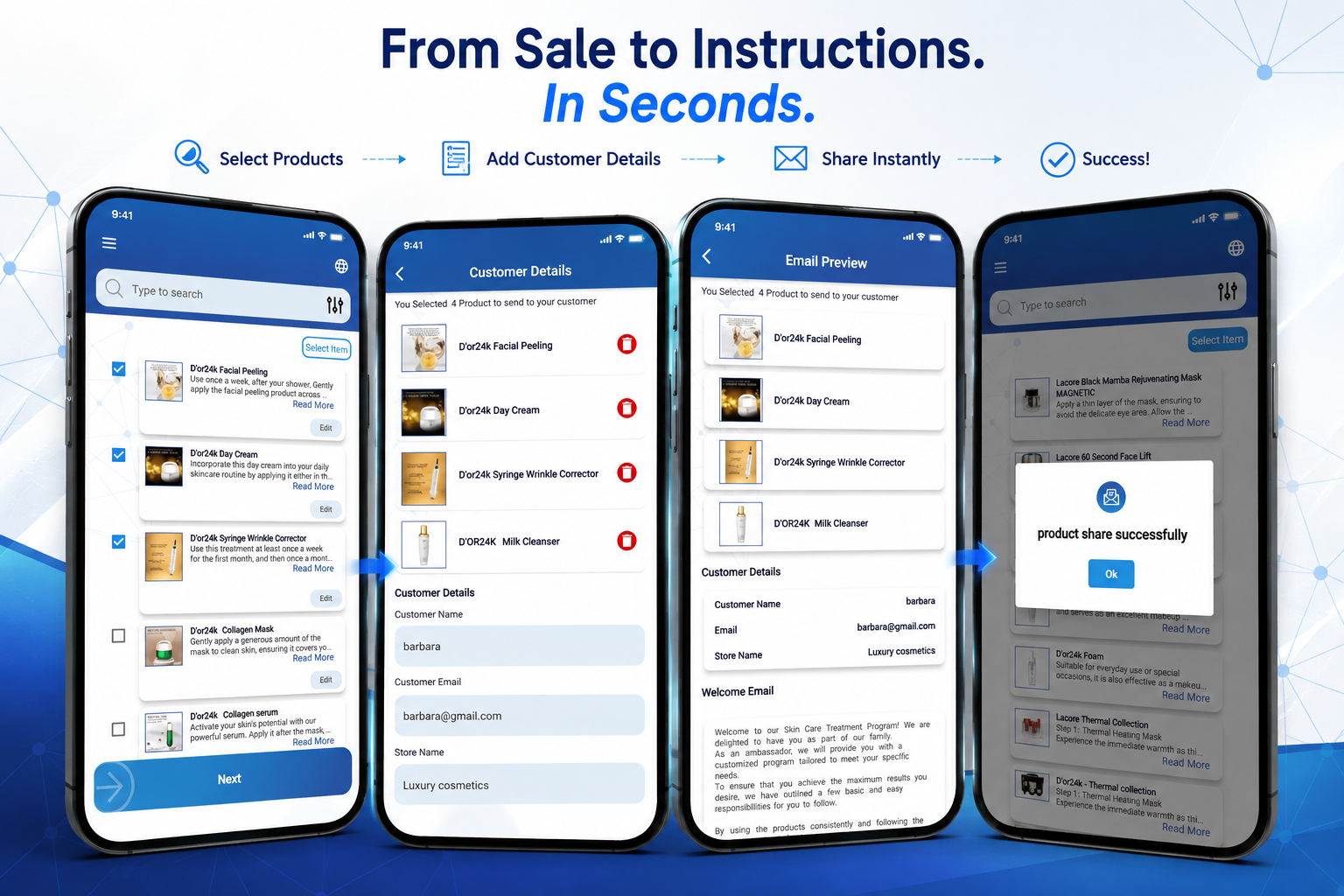
Easy Steps in action
See how a salesperson turns a product sale into a personalized instruction email in seconds.
The problem
Manual Customer Instructions Create Unnecessary Problems
Writing instructions by hand or sending them manually slows down the sales process, creates inconsistencies, and gives customers a less professional experience.
Manual Instructions Waste Valuable Selling Time
Writing product instructions by hand takes salespeople away from the next customer.
Customers Are Left Waiting
Manually preparing emails delays the instructions customers need after their purchase.
Paper Instructions Are Easy to Lose
Printed notes can be misplaced, damaged, or forgotten before the customer gets home.
Manual Emails Lack Consistency
Different formats and wording can make customer communication look unprofessional.
Important Product Details Can Be Missed
When instructions are created from memory, key usage information can easily be forgotten.
The Post-Sale Process Becomes Disorganized
Without one clear system, instructions, follow-ups, and customer communication are harder to manage.
The solution
Professional Customer Instructions in Less Than a Minute
Easy Steps guides the salesperson through one short flow, from the products on the receipt to a finished email in the customer's inbox.
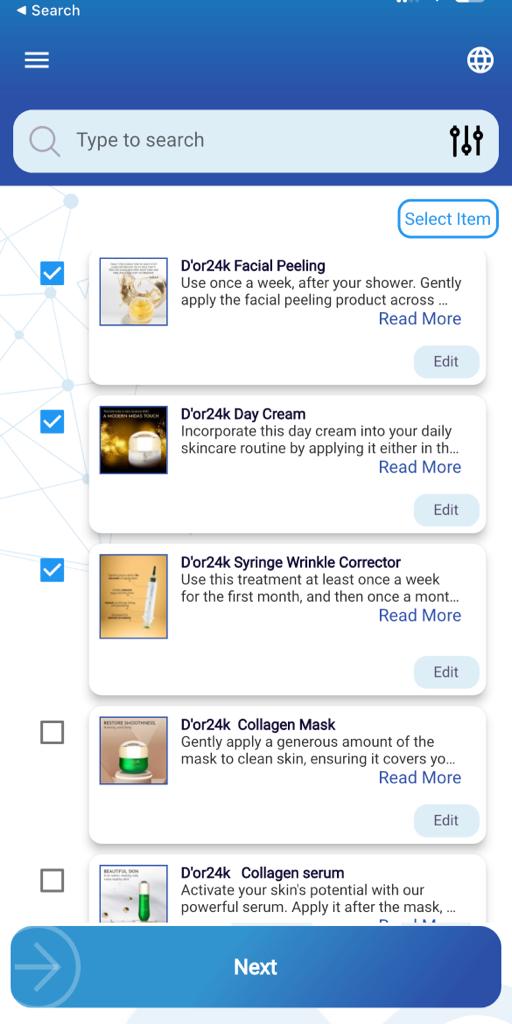
- Select the products the customer purchased
- Use the descriptions and instructions already in the app
- Edit or customize any instruction when needed
- Add personal notes, tips or an invitation
- Choose the customer's language
- Preview the email and send it instantly
Video
Watch Easy Steps in Action
 Facebook
See Easy Steps in Action
Watch a quick overview of the Easy Steps Instruction App and see how it helps salespeople create and send professional customer instructions quickly and easily.
Watch the App Overview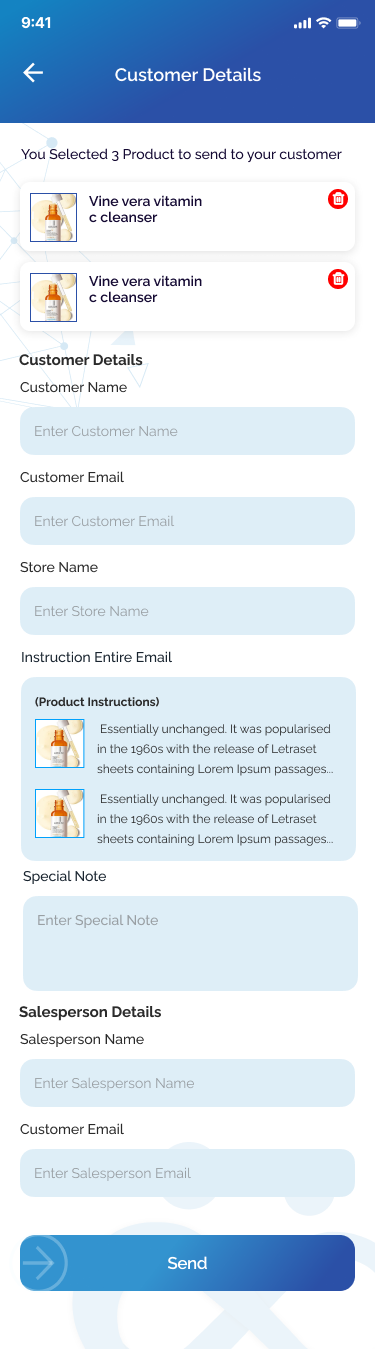 Facebook
How to Register and Use Easy Steps
Watch the step-by-step tutorial to learn how to create your account, set up your store, select products, customize instructions, choose a language, preview the email, and send it to the customer.
Watch the Setup TutorialHebrew walkthrough for cosmetics counters and kiosks
A Hebrew-narrated explainer for beauty kiosks, carts and cosmetics stores: how a salesperson turns a sale into a personalized instruction email in seconds.
How It Works
Built for the Pace of a Busy Counter
From selecting the products to sending the finished instructions, Easy Steps keeps the entire process fast, clear, and professional.
Want to see the full app? Watch the Easy Steps overview.
- 01
Create Your Account and Select Your Store
Set up your account, business email, and store information.
- 02
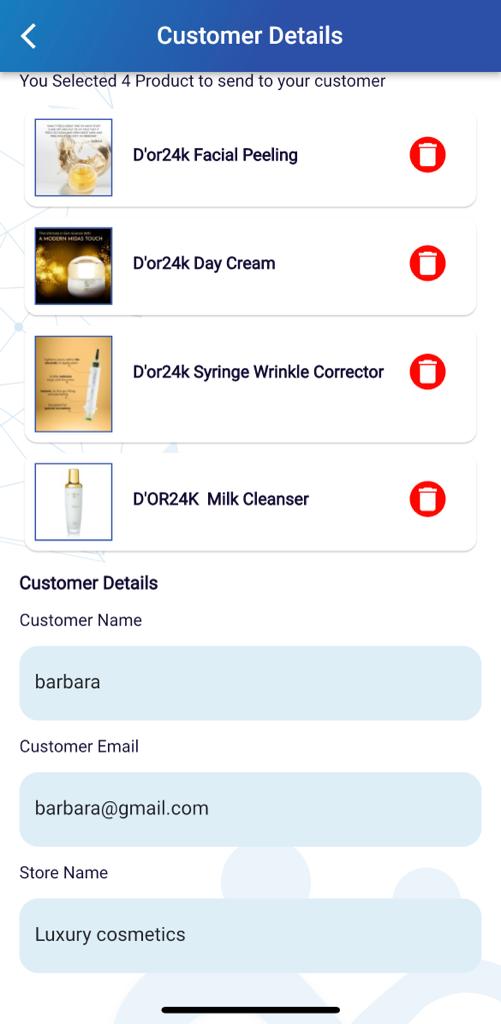
Add the Customer and Select the Products
Enter the customer's details and choose the products they purchased.
- 03
Customize the Instructions and Choose the Language
Edit product instructions, add personal notes, and select English, Spanish, or Hebrew.
- 04
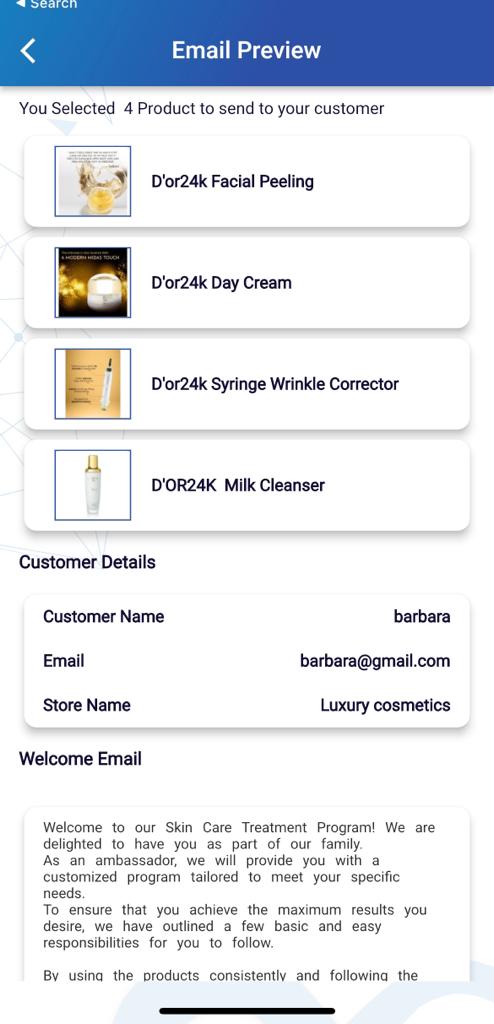
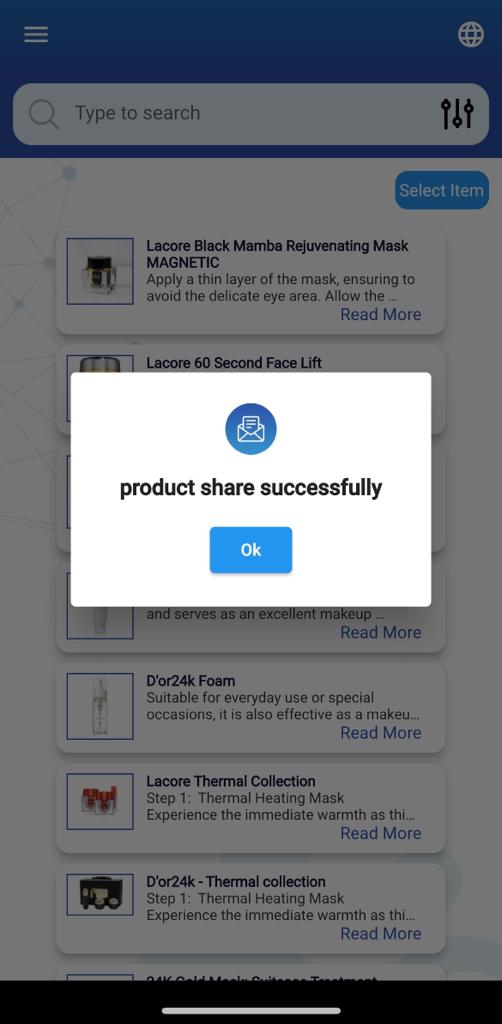
Preview and Send
Review the completed email and send the instructions directly to the customer.
What the customer receives
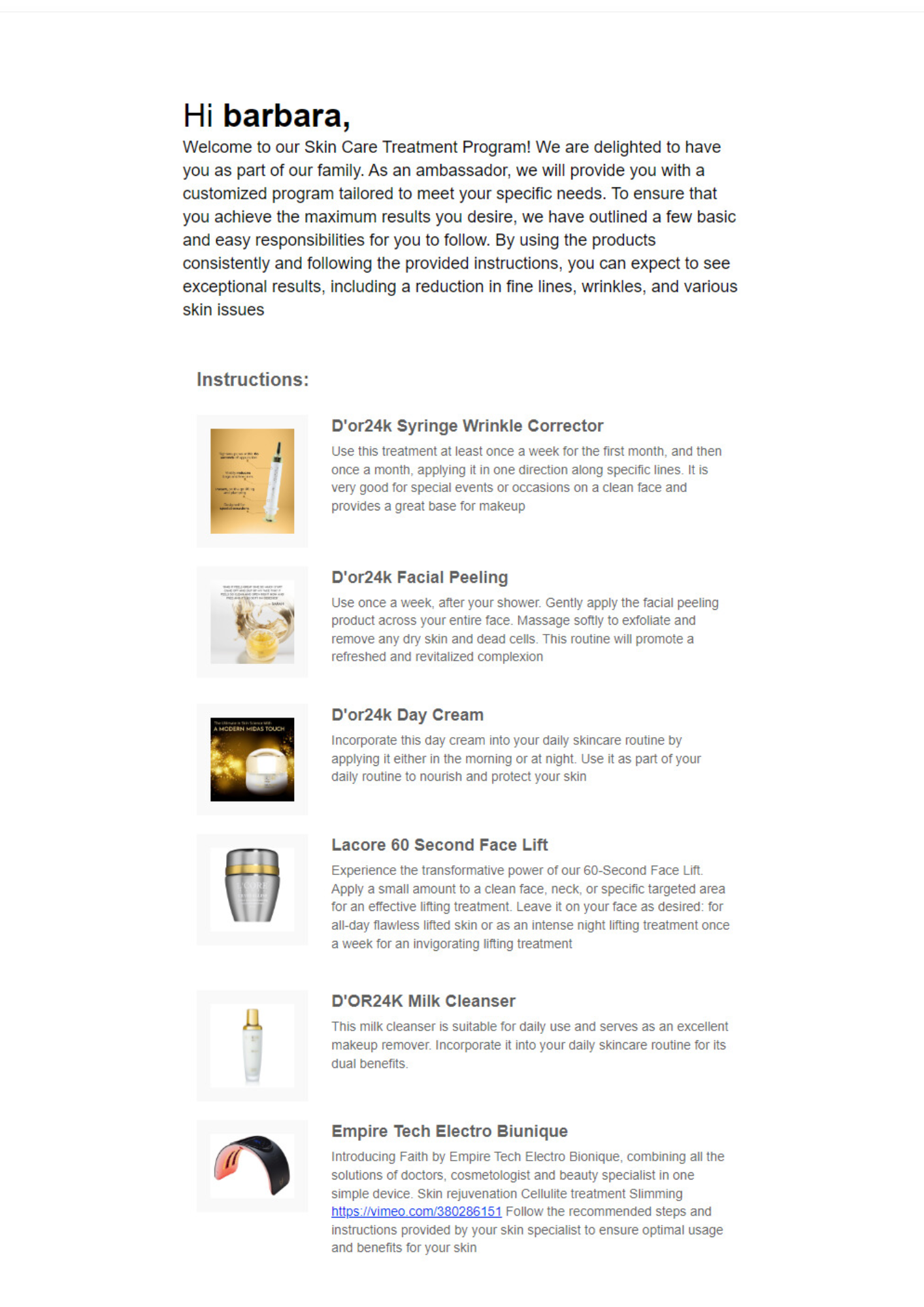
A branded instruction email
Personal greeting, the purchased products, and clear step-by-step usage instructions.
Features
Everything the sales floor needs
Fast instruction creation
A complete, personalized instruction email in less than a minute.
Personalized emails
Customer name, purchased products and your own notes in every message.
Editable product details
Use the built-in descriptions or adjust them for the specific customer.
Multilingual communication
Send instructions in English, Spanish or Hebrew.
Email preview
See exactly what the customer will receive before you press send.
Direct customer feedback
Customer replies arrive straight in the business inbox.
Professional store branding
Consistent, branded emails from every salesperson and every store.
Less paperwork
Replace printed leaflets and handwritten notes with a digital record.
Languages
Communicate With Every Customer
Instructions can currently be sent in English, Spanish or Hebrew. The salesperson simply switches the language before sending the email.
English
Apply a small amount every morning.
Español
Aplique una pequeña cantidad cada mañana.
עברית
מרחו כמות קטנה בכל בוקר.
Benefits
Value on every side of the counter
For salespeople
- Save time on every sale
- Serve more customers in the same shift
- Avoid repetitive manual writing
- Deliver a better post-sale experience
For store owners
- Improve professionalism at the counter
- Standardize customer communication
- Increase customer satisfaction
- Give the sales team one consistent process
For customers
- Clear, personalized instructions immediately
- Everything in their preferred language
- Accessible anytime in their inbox
- Nothing to lose, nothing to remember
Who it's for
Made for beauty and retail teams
Business solutions
Built for Individual Stores and Retail Chains
Easy Steps supports individual salespeople, single stores, beauty businesses and larger retail chains — with options that grow alongside the team.
- Easy Steps subscriptions
- Store-wide access
- Employee accounts
- Custom branding
- Customized product databases
- Licensing opportunities
- Custom solutions for retail chains
Save Time. Improve Service. Send Better Instructions.
Give your sales team a faster and more professional way to communicate with customers after every sale.
PARTNERSHIPS & GROWTH
Grow With Easy Steps Pro
Easy Steps Pro is building a faster and more professional way for sales teams to deliver personalized product instructions after every sale. We are open to investment, strategic partnerships, business relationships, promotion opportunities, and qualified referrals that can help expand the platform into more stores, brands, retail businesses, and sales environments.
Investors
Easy Steps Instruction App is a completed and operating product designed for salespeople, beauty businesses, retail stores, brands, and multi-location companies. We are open to conversations with qualified investors who understand retail technology, beauty, cosmetics, SaaS, customer experience, or business growth.
Explore Investment OpportunitiesStrategic Partners
We are looking for experienced individuals and organizations that can help Easy Steps Pro grow through business development, retail relationships, beauty brand connections, technology, distribution, sales, marketing, licensing, or strategic guidance.
Explore Strategic PartnershipsPromotion & Referrals
Consultants, agencies, influencers, sales professionals, and industry connectors may apply to promote Easy Steps Pro or introduce qualified stores, beauty businesses, brands, and retail organizations. Referral or promotional compensation is available for approved and successful opportunities, subject to a separate written agreement.
Explore Promotion OpportunitiesContact
Let's set up your demo
Tell us about your store or chain and we'll walk you through Easy Steps with your own products and instructions.
General & Business Inquiries:estepsart@gmail.com
App Support:easystepsapp@gmail.com
We reply to demo requests within two business days
Available on the App Store and Google Play.
Need help getting started? Watch the setup tutorial.